
The Spike Mod APK Errors, A Complete Guide to fix them Fast
Complete Guide to Fix The Spike Mod APK Errors Fast
Spike volleyball fans often get confused when a game file fails on Android. One tap says “App not installed.” Another try leads to a black screen. The game may open for two seconds, then close. Does that mean your phone is broken? Not always.
Most Spike Mod APK Errors come from Android settings, package conflicts, storage limits, app signing issues, old game files, or an unsafe APK source. The fix is often simple when we check one thing at a time.
This guide gives clear and practical help. We will cover install errors, parse errors, crashes, update conflicts, stuck loading, emulator issues, and unsafe “APK fixer” apps. We will keep phone safety in mind. If a file looks risky, delete it and use the official game version instead. to get official version the the spike mod apk visit Google Play store.
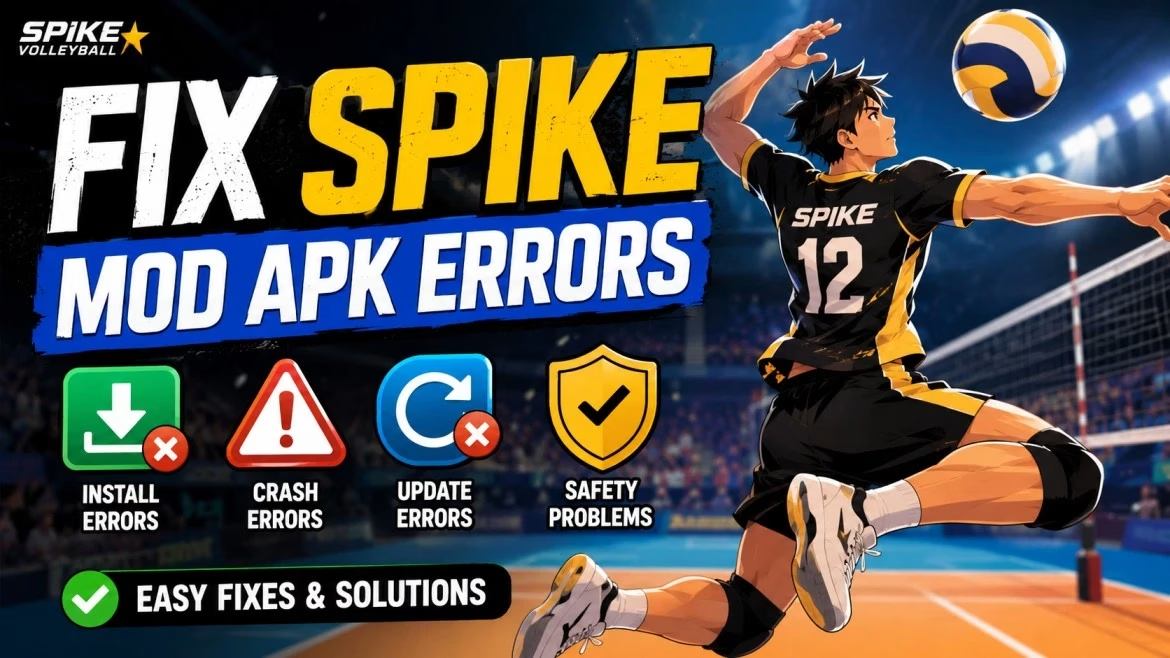
What Are Spike Mod APK Errors?
Spike Mod APK Errors are problems that appear when an Android phone tries to install, open, or run a modified APK file for Spike Volleyball. An APK is the Android app file format. Your phone reads it, checks the package name, checks the signature, then installs it.
A modded APK may change game files, ads, resources, or app data. That change can create extra errors that the official app may not have. Android may block the install. Google Play Protect may warn you. Your phone may stop the app to protect storage, battery, or private data.
Many users think every error means the file is bad. That is not true. Some files fail from simple causes. Some fail from real safety risks. The skill is knowing the difference.
Quick Error Map
Quick Error Map
Before we fix Spike Mod APK Errors, match your problem with the likely cause. This saves time and keeps you from changing random settings.
| Error message or issue | Likely cause | Safe first fix |
| App not installed | Old version conflict, low storage, bad app signature | Remove old app, restart, check storage |
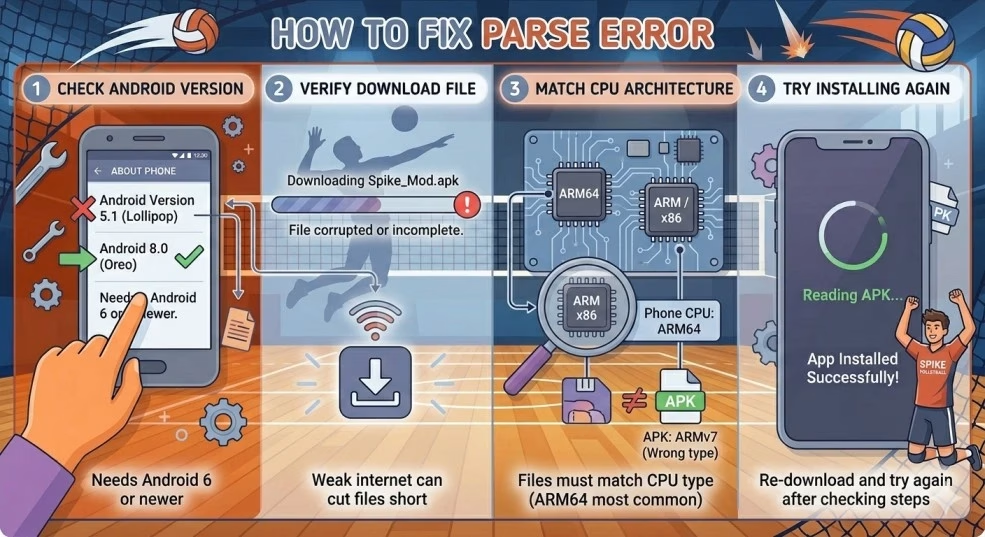
| Parse error | Wrong Android version, broken download, wrong CPU build | Re-download, check Android version |
| Game opens then closes | Low RAM, bad cache, old APK build | Restart, clear cache, close background apps |
| Black screen or endless loading | Damaged game data, graphics issue, network check | Clear cache, try airplane mode once |
| Update failed | New file signed with a different key | Remove old version, install fresh |
| Play Protect warning | File may act in a harmful way | Stop install and scan device |
Google Play Protect checks apps for harmful behavior, including apps from outside Google Play. That matters for modded files, since they often come from third-party sites.
Why “App Not Installed” Happens
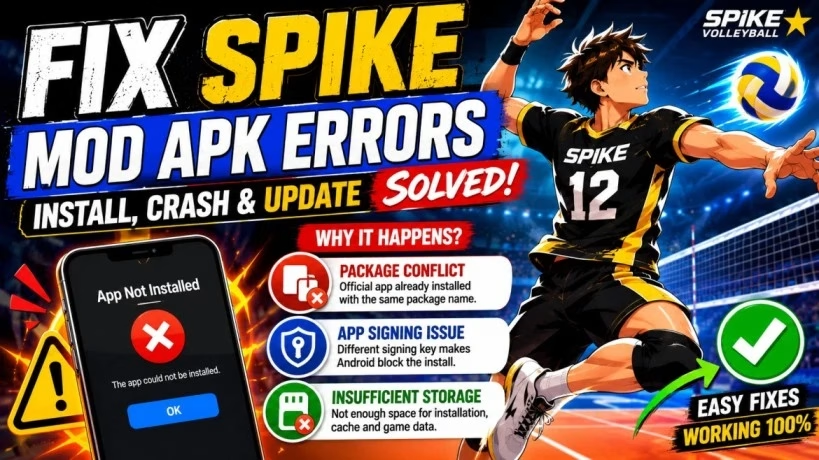
“App not installed” is one of the most reported Spike Mod APK Errors. It looks vague, but Android usually blocks the install for a reason.
The most common cause is a package conflict. Android sees apps by package name. If the official Spike Volleyball app is already installed, the modded file may use the same package name. Android then refuses to install the second copy.
A second cause is app signing. Android apps are signed with a key. If your old app was signed with one key and the new APK is signed with another, Android treats it as a different build. Android developer docs explain that signing keys matter for app updates and the release flow.
A third cause is storage. APK install needs more space than the file size. A 250 MB file may need extra room for install files, cache, and game data.
Safe Fix for App Not Installed
Remove the old version first. Go to Settings, then Apps, then Spike Volleyball. Tap uninstall. Restart your phone. Check that you have at least 500 MB of free space. Then try the file again.
If the error stays, delete the APK and download a fresh copy. A broken download can look normal in your file manager but fail during install.
Do not install random “APK repair” apps. They often ask for far more permissions than a sports game needs. Why give a repair app access to your phone when Android already has install tools built in?
Safe Fix for App Not Installed
Remove the old version first. Go to Settings, then Apps, then Spike Volleyball. Tap uninstall. Restart your phone. Check that you have at least 500 MB of free space. Then try the file again.
If the error stays, delete the APK and download a fresh copy. A broken download can look normal in your file manager but fail during install.
Do not install random “APK repair” apps. They often ask for far more permissions than a sports game needs. Why give a repair app access to your phone when Android already has install tools built in?
Safe Fix for Parse Error
Delete the old file. Clear your browser download cache. Download the APK again over a steady Wi-Fi connection. Then install it from internal storage, not an SD card.
If you use an older phone, check the Android version in Settings > About Phone. If your phone runs Android 6 or earlier, newer Spike builds may not work well.
A simple file check helps too. If the APK size is much smaller than expected, the download may be incomplete or fake. Delete it rather than forcing it to install.
Game Crashes Right After Opening
Many users search for Spike Mod APK Errors after the game opens for one or two seconds and closes. This is often a runtime problem, not an install problem.
Your phone may be low on RAM. Other apps may be using memory in the background. The game cache may be damaged. The APK may not match your Android security patch. Budget devices may have weak graphics chips that struggle with game assets.
A modded APK can be less stable than the official version. The official app comes through normal testing and app store checks. A changed file may not have the same quality check.
Safe Fix for Instant Crash
Restart your phone. Then close recent apps. Open the game again before you open social apps, browsers, or other games.
If it still crashes, clear cache only. Go to Settings, Apps, Spike, Storage, then Clear Cache. Do not clear data unless you accept possible progress loss.
Next, check battery settings. Some Android phones close games to save power. Set the game to unrestricted battery use only if you trust the file and already scanned it.
If the crash stays after a fresh install, your device may not match the APK build.
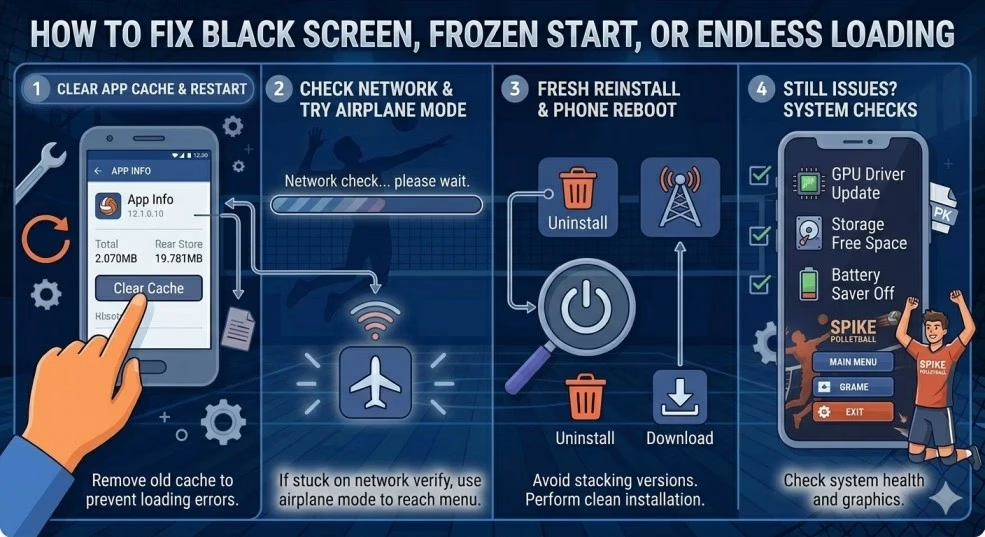
Black Screen, Frozen Start, or Endless Loading
Black screen is one of the more annoying Spike Mod APK Errors. The app installs, opens, and then sits on a blank screen. Sometimes music plays. Sometimes nothing happens.
This often comes from old cache. Your phone may load damaged textures or old saved data. A network check may hang. Some games try to verify files at launch. If that check fails, the game may freeze.
Graphics can play a part. Low-end GPUs may struggle with shadows, textures, or shader files. The screen may stay black before the menu loads.
Start with cache only. Clear cache, restart, then open the app again. This keeps your data safer than clearing all data.
If the game hangs during a network check, try opening it once in airplane mode. If the game reaches the menu, your issue may be network-related.
If nothing changes, uninstall the app, restart your phone, and install a fresh file. Do not keep installing many versions on top of each other. That often creates more Spike Mod APK Errors.
Mod Features Not Working
Some users report that the game opens but changed features do not work. This is a different type of Spike Mod APK Errors problem.
The cause may be simple: you may have installed a basic APK, not the version you expected. Some pages label files as modded, yet the file may only remove ads or change small settings. In other cases, old official data stays on the phone and the game loads that data instead.
It may be a safety sign too. If a file asks for strange permissions, shows pop-ups, or sends you to another site, stop using it.
Check the app name, file size, and permissions. A volleyball game should not need SMS, contacts, call logs, or accessibility access. Those permissions are warning signs.
Remove the app if it behaves oddly. Scan the phone with Play Protect or a known mobile security app. Then change passwords if you gave the app any account access.
We should not force changed features to run at the cost of phone safety. A clean phone is worth more than any game shortcut.
Update Failed or Version Conflict
“Update failed” often appears when users install a new version over an old one. This is one of the easiest Spike Mod APK Errors to understand.
Android checks whether the new app belongs to the same app line. Signing keys help Android confirm that. If the old file and new file were signed by different creators, Android blocks the update.
This can happen when you switch download sources. One site may sign the file with one key. Another site may sign it with a different key. Android does not treat them as the same update.
Back up progress if the game gives you a safe backup option. Then uninstall the old version. Restart your device. Install the new version as a fresh app.
Do not keep installing files from many sources. That increases update conflict and safety risk.
If you care about progress, use the official app and official cloud save. Modded versions may not protect progress during reinstall.
Emulator Errors on BlueStacks, Nox, or LDPlayer
Some people run Spike on PC through Android emulators. Spike Mod APK Errors can appear there too.
The most common emulator issues are graphics mode, low assigned RAM, virtualization off in BIOS, and wrong APK architecture. Emulators work like virtual phones. They need enough PC resources to run games well.
BlueStacks and LDPlayer may let you choose OpenGL or DirectX. One mode may crash; the other may work. Low RAM settings can create slow menus or instant close.
Set the emulator to at least 4 GB RAM if your PC allows it. Turn on virtualization in BIOS. Try switching graphics mode. Then reinstall the APK inside the emulator.
If the emulator shows safety warnings, do not ignore them. A PC can hold work files, passwords, and browser data, so risky APK files can create bigger trouble.
Security Risks You Should Not Ignore
Not every install issue is harmless. Some Spike Mod APK Errors point to a file you should delete.
A 2018 academic study looked at 1.7 million free Android apps and found that app repackaging and reverse engineering are real issues in the Android app ecosystem. This matters since modded APK files are often repacked versions of existing apps.
Fake APK pages may add hidden ad code, tracking tools, or malware. Some fake files use the game name to get clicks. After install, they may ask for permissions a volleyball game does not need.
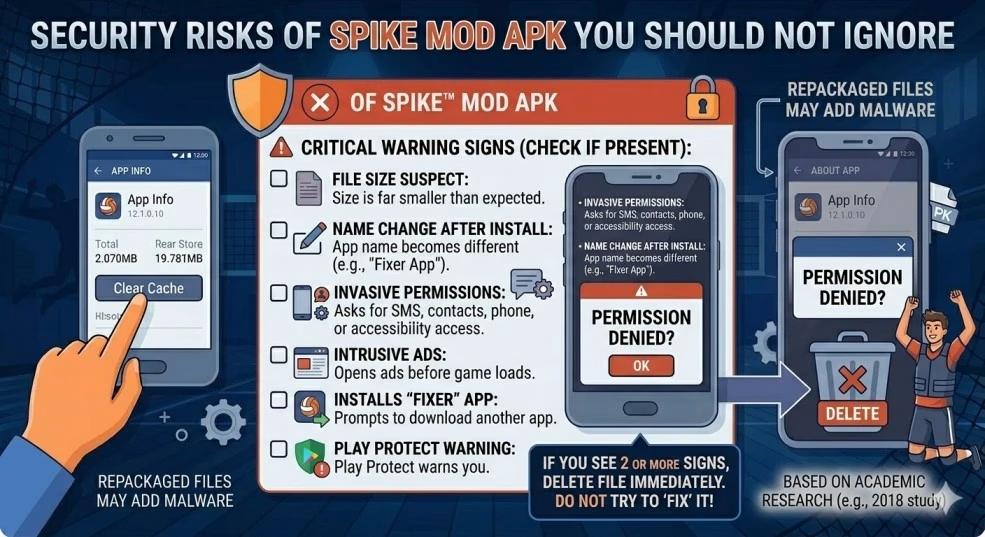
Check these warning signs:
- The file size is far smaller than expected
- The app name changes after install
- It asks for SMS, contacts, phone, or accessibility access
- It opens ads before the game loads
- It asks you to install a “fixer” app
- Play Protect warns you before install
If you see two or more of these signs, delete the file. Do not try to “fix” it.
A Safe Troubleshooting Order
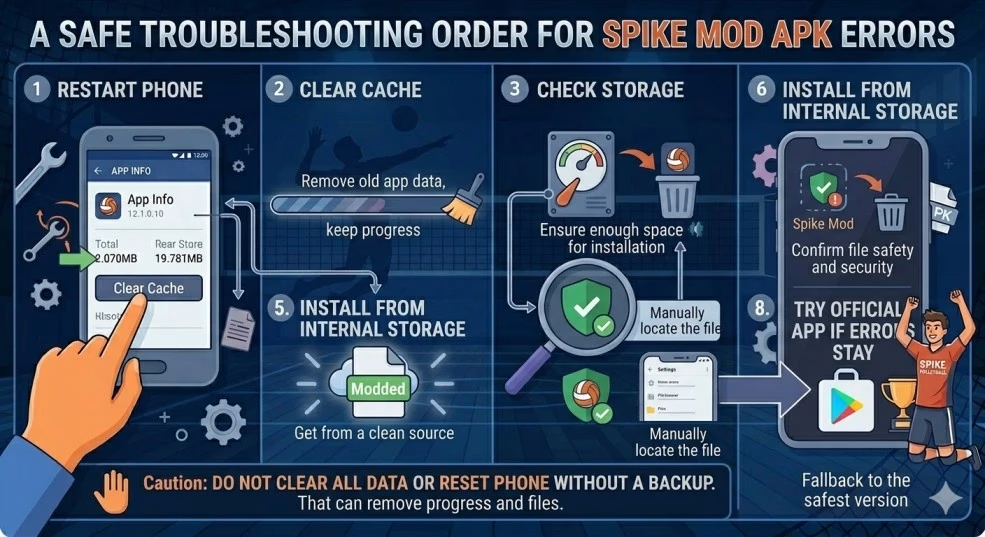
The best way to fix Spike Mod APK Errors is to move from simple steps to stronger steps. This keeps your data safer and saves time.
Start with a restart. It clears memory and closes stuck system tasks. Then clear app cache. Next, check storage. Then remove the old app and install fresh.
Use this order:
- Restart phone
- Clear cache
- Check storage
- Remove old Spike app
- Download a fresh APK
- Install from internal storage
- Scan with Play Protect
- Try official app if errors stay
Do not clear all data at the start. That can remove progress. Do not reset your phone unless you already backed up photos, messages, and files.
Device-Specific Notes
Samsung phones may block modified apps through security layers or game tools. Try removing the game from Game Launcher if it keeps closing. Keep device security on.
Xiaomi, Redmi, and Poco phones may restrict background launch. Check battery saver and allow the app to run only if you trust the file.
Realme and Oppo phones may need storage permission for game data. Give only the permission the game truly needs.
Huawei phones may manage apps with strict battery tools. Set manual app launch only after you scan the file.
Older phones with 2 GB RAM or less may fail no matter what you try. In that case, the official lightest version of the game is a better choice.
Prevention Tips for Future Spike Mod APK Errors
You can avoid many Spike Mod APK Errors with a few habits.
Keep enough free space on your phone. Use internal storage for APK files. Avoid switching between many sources. Read permissions before tapping install. Scan files before opening them. Remove old app versions before installing a new build.
Do not tap pop-ups that say your APK needs a special repair app. Android already has the tools needed for normal install checks.
Keep Android updated if your device supports it. System updates fix security gaps and improve app handling. If a game fails right after a major Android update, wait for a newer app build or use the official version.
Conclusion
Spike Mod APK Errors can look confusing, but most of them follow a clear pattern. Check the simple things first: storage, old app conflict, cache, Android version, and file source. If those steps fail, reinstall cleanly or switch to the official game.
Your phone holds photos, accounts, bank apps, and private messages. No game file should put that at risk. A safe install, clean permissions, and a trusted app source matter more than a quick shortcut.